# Boosters

If you want to turbocharge your XP growth, XP Boosters are now live and up for grabs in the inventory section of the XCAD app. You can choose between 3 different Categories:

<table data-view="cards"><thead><tr><th></th><th></th><th></th><th data-hidden data-card-cover data-type="files"></th></tr></thead><tbody><tr><td><p><strong>XP Boosts</strong></p><p></p><p>Increases your multiplier on XP rewards for 6 watches.</p></td><td><p></p><p>You have four different options to boost your XP multiplier per watch</p></td><td><p></p><p><span data-gb-custom-inline data-tag="emoji" data-code="2b50">⭐</span> <strong>x3 Multiplier XP</strong></p><p><strong>🌟 x5 Multiplier XP</strong> </p><p><strong>🌠 x10 Multiplier XP</strong> </p><p><span data-gb-custom-inline data-tag="emoji" data-code="1f3c6">🏆</span> <strong>x15 Multiplier XP</strong> </p></td><td><a href="/files/PwTwS5VLdOBytnWtsaJd">/files/PwTwS5VLdOBytnWtsaJd</a></td></tr><tr><td><p><strong>Instant XP</strong></p><p></p><p>Get XP instantly applied to a random attribute.</p></td><td>Your can purchase XP that will be instantly applied and distributed randomly to your nerd's attributes. You can get:</td><td><p></p><p><span data-gb-custom-inline data-tag="emoji" data-code="1f680">🚀</span> <strong>5,000 XP</strong> </p><p><span data-gb-custom-inline data-tag="emoji" data-code="1f680">🚀</span> <strong>10,000 XP</strong></p></td><td><a href="/files/MRe0BdbJZg12F8y3ZRCz">/files/MRe0BdbJZg12F8y3ZRCz</a></td></tr><tr><td><p><strong>Speed</strong></p><p></p><p>Allows you to earn maximum XP for any length video for a certain amount of watches.</p></td><td><p></p><p>MAX XP for:</p><p></p><p><span data-gb-custom-inline data-tag="emoji" data-code="1f441">👁️</span> <strong>x10 Watches</strong><br><span data-gb-custom-inline data-tag="emoji" data-code="1f440">👀</span> <strong>x20 Watches</strong><br><span data-gb-custom-inline data-tag="emoji" data-code="1f60e">😎</span> <strong>x50 Watches</strong></p></td><td></td><td><a href="/files/9FF01nrI9cTYDgFVMLMG">/files/9FF01nrI9cTYDgFVMLMG</a></td></tr><tr><td><p><strong>Reset Watch History</strong></p><p></p><p>Wipe your PLAY watch history, allowing you to re-watch videos and get rewarded!</p></td><td></td><td></td><td><a href="/files/ajPJqjlJ6qkJyrfXrzAD">/files/ajPJqjlJ6qkJyrfXrzAD</a></td></tr></tbody></table>

{% hint style="success" %}
For XP Boosts the golden rule remains the same: the longer the videos you watch, the more XP you reap. But with boosts, it's like having a tailwind
{% endhint %}

## Combining Boosts

❌No Season pass + no booster = **x1** your XP

:white\_check\_mark: Season pass + no boost = **x4** your XP

:white\_check\_mark::white\_check\_mark: Season pass + x3 boost = **x6** your XP

:white\_check\_mark::white\_check\_mark::white\_check\_mark:  Season pass + x5 boost = **x8** your XP

:white\_check\_mark::white\_check\_mark::white\_check\_mark::white\_check\_mark: Season pass + x10 boost = **13x** your XP

:white\_check\_mark::white\_check\_mark::white\_check\_mark::white\_check\_mark: Season pass + x15 boost = **18x** your XP

## Buying Boosters

1. Go to the "Inventory" tab on your application

<div data-full-width="false"><figure><img src="/files/1n3HTqMhibRZq3EaF6WY" alt="" width="226"><figcaption></figcaption></figure></div>

2. Go to the "Buy Items" section and click on "Buy Now" on the booster you want to equip your nerd with corresponding to your Nerd's Rarity

{% hint style="info" %}
You can use the filters to find the boosters suited for your Nerd's rarity
{% endhint %}

<figure><img src="/files/bmXOqpUML8YjMasLp3iB" alt=""><figcaption></figcaption></figure>

2. Review the Booster benefits, upgrade cost, transaction fee and confirm the purchase

{% hint style="danger" %}
Boosters are non-refundable, so make sure to buy the right amount and type
{% endhint %}

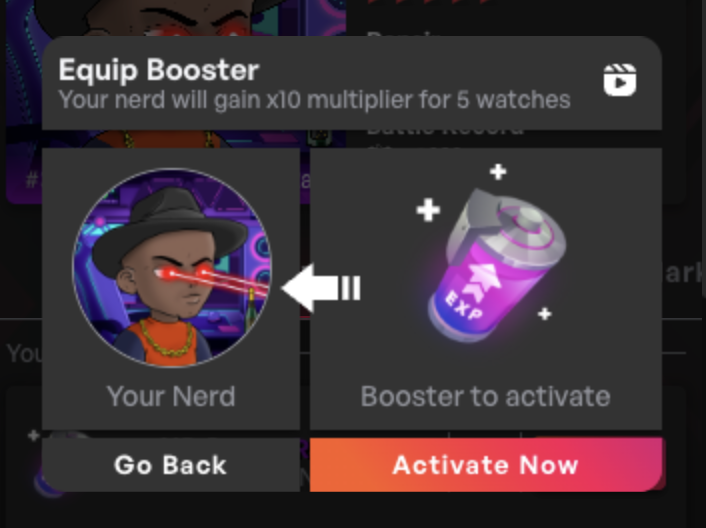
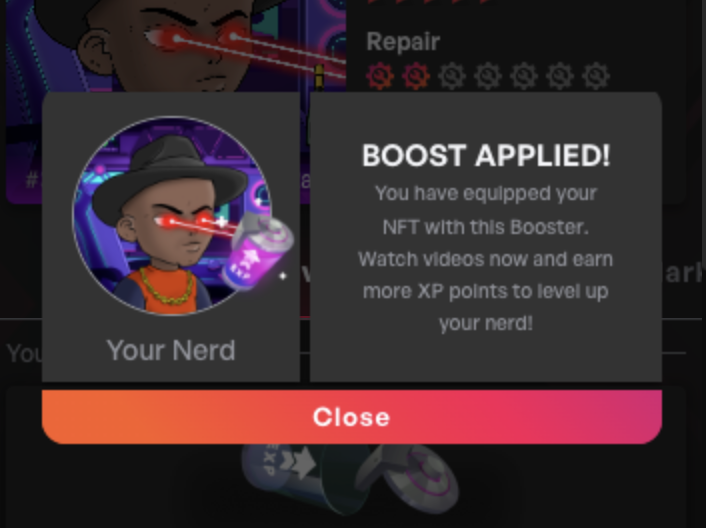
2. Wait a few seconds/minutes so that your Booster becomes available and when you get the option to do so on your Inventory section, click "Equip" or "Spend" or "battle" depending to the one you got

<div><figure><img src="/files/LYdqWLaknaw6l3EFKc10" alt=""><figcaption></figcaption></figure> <figure><img src="/files/UFxBJxgNNzNpBSbI1APQ" alt="" width="353"><figcaption></figcaption></figure> <figure><img src="/files/M8yqpS668FzOef8dhpgr" alt="" width="353"><figcaption></figcaption></figure></div>

3. And that is it! You have equipped your currently active Nerd with the Booster and you can see which boosters you have active and which ones will be activated next on your Nerd's detail page

<figure><img src="/files/XtA2esNUN2kKi74VcCm3" alt=""><figcaption></figcaption></figure>

{% hint style="info" %}
You can buy more than 1 booster and they will be applied one by one. Once you have used up the current equipped one, the next in line will be activated and applied to your subsequent watches
{% endhint %}


---

# Agent Instructions: Querying This Documentation

If you need additional information that is not directly available in this page, you can query the documentation dynamically by asking a question.

Perform an HTTP GET request on the current page URL with the `ask` query parameter:

```
GET https://docs.theenergyarea.com/earning-rewards/boosters.md?ask=<question>
```

The question should be specific, self-contained, and written in natural language.
The response will contain a direct answer to the question and relevant excerpts and sources from the documentation.

Use this mechanism when the answer is not explicitly present in the current page, you need clarification or additional context, or you want to retrieve related documentation sections.